Download Android Lollipop 5.0 stock firmware for Oppo R7 Plus smartphone


Download Android Lollipop 5.0 stock firmware for Oppo R7 Plus smartphone from here or from here. Download another Oppo firmware from here. 

Firmware details
Archive:R7Plus_11_A.10_OTA_010_all_201511161155_wipe
Firmware: Android Lollipop 5.0 stock
Model: Oppo R7 Plus smartphone
Image: R7Plus_11_A.10_OTA_010_all_201511161155_wipe.zip
Image file size: 890 MB
Platform: Qualcomm Snapdragon 615
Build number: OPPO/R7Plus/R7Plus:5.0/LRX21M/1431939987:user/release-keys


Caution: Please do not update firmware unless you know what you are doing, you really want it or it is absolutely necessary. Firmware updates may occasionally have bad results, like bricking your device, temporarily or permanently. The firmware update process is done entirely at your own risk. Before attempting to update the firmware, back up your data.


Don’t miss any of our future video tutorials, follow us on Youtube. Like us on Facebook. Add us in your circles on Google+. Watch our photo albums on Flickr. Subscribe now to our newsletter.
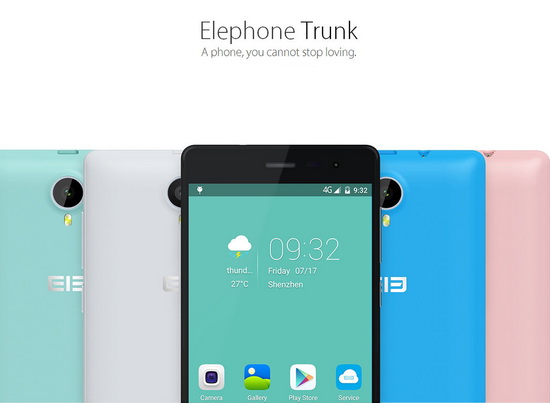
Download Elephone Trunk Cyanogenmod 13 based on Android 6.0

http://www.elephone.hk/Trunk.html


Download Elephone Trunk Cyanogenmod 13 based on Android 6.0 from here or from here. Download Cyanogenmod 12.1 for Elephone Trunk smartphone from here.


Firmware details
Archive: Elephone Trunk Cyanogenmod 13_20151124_based on Android 6.0
Firmware image: Elephone Trunk Multi-language cm-13.0-20151124.zip
Platform: Qualcomm Snapdragon 410
Archive size: 382 MB
Build number: 13.0-20151124-UNOFFICIAL-Trunk
Inside archive: firmware + trunk1-twrp-chs (twrp-recovery.img + tools)


Installation
1.  Install TWRP recovery
2. Copy the rom.zip in your phone memory or SD card.
3. Boot to TWRP (power & vol+)
4. Wipe - Factory reset
5. Install rom.zip
6. Reboot, enjoy

Features
- support multi-language
- based on android 6.0


Caution: Please do not update firmware unless you know what you are doing, you really want it or it is absolutely necessary. Firmware updates may occasionally have bad results, like bricking your device, temporarily or permanently. The firmware update process is done entirely at your own risk. Before attempting to update the firmware, back up your data. 


Don’t miss any of our future video tutorials, follow us on Youtube. Like us on Facebook. Add us in your circles on Google+. Watch our photo albums on Flickr. Subscribe now to our newsletter.

Download Elephone P8000 Flyme OS 4.5.4 firmware based on Android 5.0

http://www.elephone.hk/P8000.html


Download Elephone P8000 Flyme OS 4.5.4 firmware based on Android 5.0 from here or from here. 


Firmware details
Archive: Elephone P8000_flyme_4.5.4_20151201_ based on Android 5.1
Firmware image file name: p8000_flyme4.5.4.1i.zip
Platform: Mediatek MT6753
Archive size: 722 MB
Build number: Lenovo/full_aio_otfp/aio_otfp:5.0/LRX21M/R203.03301337:user/release-keys
Inside archive: firmware + rooot tutorial (p8000-recovery + SuperSU_Pro_v2.49.zip)

Rom flashing
1. Download and install recovery
2. Copy the ROM to your phone
3. Press and hold vol + key and power key at the same time to enter recovery mode.
4. Flash the ROM

Highlight
This software update including enhancements and improvements for your device.

Changelog
System
Fixed the occasional rebooting bug;
Phone
Fixed the occasional bug of the Phone app being shut down abnormally;
Fixed the program crash when tap 'Add to marked' in detail page of call log;
Messages
Fixed the occasional failure in syncing Messages;
Fixed the problem in which the message reply icon is useless when receiving an incoming call;
Wi-Fi
Fixed the slow response problem occurred in the system after disable WPS;
Email
Fixed the problem of unable to login to vanke email account;
Third-party apps
Fixed the crash bug when input and long press text in Jota+ app;
Fixed the bug of the phone being unable to upload videos to Instagram.

Tips
Downloading via mobile networks may incur additional charges. If possible, please download via Wi-Fi network.
To avoid loss of data & if required, please perform Flyme or relevant backups before upgrading.
To avoid bricking the phone, do not turn off or reboot the device while upgrading.


Caution: Please do not update firmware unless you know what you are doing, you really want it or it is absolutely necessary. Firmware updates may occasionally have bad results, like bricking your device, temporarily or permanently. The firmware update process is done entirely at your own risk. Before attempting to update the firmware, back up your data. 


Don’t miss any of our future video tutorials, follow us on Youtube. Like us on Facebook. Add us in your circles on Google+. Watch our photo albums on Flickr. Subscribe now to our newsletter.

Our Next Milestone: 150.000 monthly unique visitors. Take advantage of it and promote your great products for free!


Do you need a reviewer? :)
We are a young team of passionate big fans of gadgets and for some time now we are testing various Android products (tablets, smartphones, smartwatches & Mini Pc) for companies from China, providing to the communities of fans solutions & HD video tutorials with detailed guidance, fixes & workarounds.
We can generate presentations,  unboxing articles, hands-on previews, permanent banners, articles with links / prices to your website store.

Our tech blog traffic significantly increased over the last half year, and now we are heading to the next milestone: 150.000 monthly unique visitors. Let's just do it together!

Take advantage of it and promote your great products for free! I am sure your only store or your company has press releases to send us about your amazing new devices or free samples to review.


You can send us samples to review. We will generate several articles for every sample (unboxing, hands-on, firet impressions, tests, reviews, how to, etc) + at least another 5 to 10 free articles for your company, at your choice (news, press releases, firmware releases, flash sales, offers, new products teasing, etc). Or even more. ;)

We are offering great advertising support for all chinese online stores. 
 

What are we looking to test and review next, so you can feel free to send us:
- Dual Boot Android / Windows tablets
- Windows tablets
- Windows Mini PC
- 64 bit CPU smartphones
- bluetooth speakers (Earson, etc)
- Action Camera & Ant IP Camera
- Smart watches
- EZCast new devices
- memory cards, memory solutions, HDD, SSD
- Smart Home devices
- Intelligent Toys.


Our website: http://chinagadgetsreviews.com
Our blog: http://chinagadgetsreviews.blogspot.com
Our Facebook Fan Page: https://www.facebook.com/ChinaGadgetsReviews
Our Youtube channel: https://www.youtube.com/user/chinaproductsreviews
Our Google+ pages: https://plus.google.com/u/1/+ChinaGadgetsReviews
& https://plus.google.com/b/117117575244708597841/+Chinagadgetsreviewsofficial

Twitter: https://twitter.com/NewChinaGadget
Flickr: https://www.flickr.com/photos/cgreviews/sets
Get 'Download Android Firmwares' Android application free from Play Store or download from here the .apk file.


The blog has in the last 30 days about 125,000 unique visitors and over 180,000 views. Statistics are public on blog, provided by Google Analytics. Traffic is steadily rising.

Download Mediatek MTK USB Auto Installer v0.9.8


Download Mediatek MTK USB Tools v0.9.8 from here, here or here.
Download Mediatek MTK USB Tools v0.9.7 from here.

Archive name: MTK_USB_Al_0.9.8
Archive size: 54 MB

Archive content:
- SP_Drivers_EXE_v1.6
- SP_Drivers_EXE_v2.0
- Driver_Auto_Installer_v1.1352
- Driver_Auto_Installer_v5.1453
- Driver_Auto_Installer_v5.1524


Don’t miss any of our future video tutorials, follow us on Youtube. Like us on Facebook. Add us in your circles on Google+. Watch our photo albums on Flickr. Subscribe now to our newsletter.

Download ACTIONS Pad Firmware Modify Tool v1.08


Download ACTIONS Pad Firmware Modify Tool v1.08 from here, here or here.
Download ACTIONS Pad Full Tools Pack from here.


Don’t miss any of our future video tutorials, follow us on Youtube. Like us on Facebook. Add us in your circles on Google+. Watch our photo albums on Flickr. Subscribe now to our newsletter.

Download VIBEUI V2.0 firmware for Lenovo S90-U 2G smartphone


Download VIBEUI V2.0 firmware for Lenovo S90-U 2G smartphone from here or from here. 


Firmware details
Archive name: 2G-S90-u_VIBEUI_V2.0_1504_5.14.1_ST_Lang-PK
Archive file size: 760 MB
Support: Processor: Qualcomm Snapdragon 410


Caution: Please do not update firmware unless you know what you are doing, you really want it or it is absolutely necessary. Firmware updates may occasionally have bad results, like bricking your device, temporarily or permanently. The firmware update process is done entirely at your own risk. Before attempting to update the firmware, back up your data.


Don’t miss any of our future video tutorials, follow us on Youtube. Like us on Facebook. Add us in your circles on Google+. Watch our photo albums on Flickr. Subscribe now to our newsletter.