Tampilkan postingan dengan label smart tv box. Tampilkan semua postingan

Download latest Android KitKat 4.4.2 stock firmware for Acemax K1 TV Box


Download latest Android KitKat 4.4.2 stock firmware for Acemax K1 DVB S2 TV Box from here or here. Download previous firmware from here.

  
Firmware details
Archive: K1_S805_ S2_ 28102015
Image: K1 S2 1028 / KI-ota-20151028.140846.V0823.zip
Model: Acemax K1 DVB S2 TV Box
Firmware:  Android KitKat 4.4.2 stock firmware
Image file size: 614 MB
Platform: Amlogic S805
Build number: KI-user 4.4.2 KOT49H 20151028.140846.V0823 test-keys


Caution: Please do not update firmware unless you know what you are doing, you really want it or it is absolutely necessary. Firmware updates may occasionally have bad results, like bricking your device, temporarily or permanently. The firmware update process is done entirely at your own risk. Before attempting to update the firmware, back up your data. 

Don’t miss any of our future video tutorials, follow us on Youtube. Like us on Facebook. Add us in your circles on Google+. Watch our photo albums on Flickr. Subscribe now to our newsletter.

Download latest KitKat 4.4.2 stock firmware for EM12 MXQ TV Box


Download latest KitKat 4.4.2 stock firmware for EM12 MXQ TV Box from here or here. To flash firmware on this box from SD card read this article. Download previous firmware from here.


Firmware details
Archive: amlogic-s805-mxq-ota-20151124
Model: EM12 MXQ TV Box
Image file size: 689 MB
Platform: Amlogic S805 quad core
Update file name: amlogic-s805-mxq-ota-20151124(kodi14.2).zip
Build number: m201C-user 4.4.2 KOT49H 20151124 test-keys

Caution: Please do not update firmware unless you know what you are doing, you really want it or it is absolutely necessary. Firmware updates may occasionally have bad results, like bricking your device, temporarily or permanently. The firmware update process is done entirely at your own risk. Before attempting to update the firmware, back up your data. 

Don’t miss any of our future video tutorials, follow us on Youtube. Like us on Facebook. Add us in your circles on Google+. Watch our photo albums on Flickr. Subscribe now to our newsletter.

Download Android 4.4.2 KitKat for EKB311 / MK888 / K-R42 / Q7 / CS918 / Ugoos MK809IV TV Boxes


Download Android 4.4.2 KitKat for EKB311 / MK888 / K-R42 / Q7 / CS918 / Ugoos MK809IV TV Boxes from here or here. Download previous firmware from here.


Firmware details
Update file name: update_TV03_8723_4.4_rotation_2015_10_21
Image: update.img
Archive size: 255 MB
Model: EKB311 / MK888 / K-R42 / Q7 / CS918 / Ugoos MK809IV TV Boxes
Model number: rk3188
Platform: Rockchip RK3188
Build number: rk3188-eng 4.4.2 KOT49H eng.root.20151015.232131 test-keys
FW version: 4.4.02
Boot version: 2.16


Caution: Please do not update firmware unless you know what you are doing, you really want it or it is absolutely necessary. Firmware updates may occasionally have bad results, like bricking your device, temporarily or permanently. The firmware update process is done entirely at your own risk. Before attempting to update the firmware, back up your data. 

Don’t miss any of our future video tutorials, follow us on Youtube. Like us on Facebook. Add us in your circles on Google+. Watch our photo albums on Flickr. Subscribe now to our newsletter.

Ugoos firmware v.3.0.2.b for UT3, UM3, UT3S based on Android 5.1.1


OTA update and multi-window inside. Check this out. Since last Android 5.1.1 firmware release less than 3 weeks past, so now we have new Firmware version 3.0.2. We added some new features and raise up stability.

The first user-friendly feature is OTA update support: Rather simple and comprehensible feature let you be in touch with latest firmware updates for your Ugoos device. You can check updates by yourself or turn on auto-update and device do all the job by itself: offer you to download new firmware when there will be a new one on our servers. So since that version there is no need to use batch tool and reflash your device manually.

The second new feature is multi-window function. Powered by Rockchip for Android 5.1.1 this feature allows you to share a screen into few parts for different apps.Multi-window feature activated in main settings menu, display submenu.

After activating this feature we see that bottom bar changes its appearance. Now there is a button down left corner that allows you to access application menu. Bottom bar turns into a status bar and we can see opened applications and switch among them. All displayed apps get additional upper bar with 3 common and well known buttons: minimize to tray, extend and close. Extend button allows to choose 3 different sizes. Though some apps don’t let resize your window and turns into book orientation after activating this function.

Another interesting function is an advanced screenshotting feature. It runs only in multi-screen mode, after activation in settings menu. After activating screenshotting button appeared on the bottom bar. It allows you to choose 4 different screenshot feature:
- Static screenshot – makes a simple picture of a working space on the screen. In this mode you can customize screenshot area.
- Dynamic screenshot - allows you to choose a resizable window for making a small video in mp4 format or gif image. Additional settings let you customize frame rate and choose duration in seconds
- Whole screenshot – makes a picture of the whole screen with bars and context menus.
- Comment mode - allows to write some notes using air mouse right on the screen and save them with screenshot.

Full changelog
- Fixed bug with Developer Options menu item.
- Fixed unexpected reboot during separate web cameras using.
- Added basic multi-window support function.
- Improved video playback in side players (MXPlayer now use hardware decoders for video playback)
- “Close all active apps” button added in “recent apps” window, also all apps can be closed using “menu” button on RC
- Long hold button function added. Holding “menu” – bars appeared and disappeared; “recent apps” button activate/deactivate air mouse function mode.
- OTA updates support added.


Don’t miss any of our future video tutorials, follow us on Youtube. Like us on Facebook. Add us in your circles on Google+. Watch our photo albums on Flickr. Subscribe now to our newsletter. Biggest firmware download center.

Video & Photo Gallery: Qintex Q12 4K Smart TV Box - First impressions & Quick Review. The complete multimedia player!


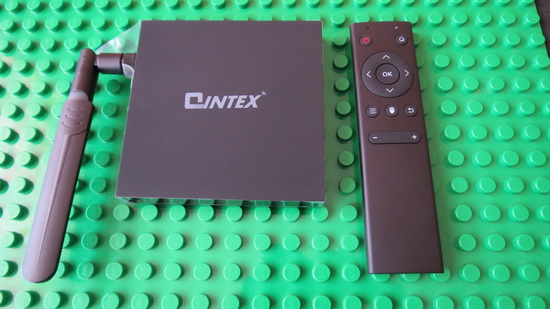
As I told you in this article, Qintex Company send me a few days ago a new Amlogic S812 Android TV Box: Qintex Q12 TV Box model. Here you'll find a photo gallery and a video with the unboxing of this beautiful device.

The TV box has a black plastic exterior case, it is compact and very well organized, with and all the connectors located in the right & rear sides. In the front side it has only the IR receiver & a beutiful power LED. The external WiFi antenna is located on the left side.


You can buy Qintex Q12 4K Smart TV Box from www.qintexworld.com & alibaba.com (wholesale) or aliexpress.com (end users).


Next, watch the first impressions and the experience on Android KitKat 4.4.2 stock firmware.
Firmware tested: stock Android Lollipop 4.4.2
Kernel version: 3.10.33
Build number: KOT49H.20151030 

Root: Firmware is not rooted.

Full photo album here.


The firmware runs just great and there are a lot of preinstalled applications, including Play Store and Google applications (gapps) and very useful online video content: CloudTV, DailyMotion, FilmOn Live TV, Hulu Plus, Kodi, Netflix, Popcorn Time, ShowBox, SopCast, Vevo & VUDU Movies and TV.

In Antutu Video Tester 3.0 Qintex Q12 4K Smart TV Box an unbelievable 1062 points, an incredible score in this test ranking. It played smoothly all video file types; in fact this firmware version fully supports all 30 video & audio format files.In Antutu Benchmark 5.7.1 the device achieves also a great score, about 35.000 points.


As you can see, Qintex Q12 Smart TV Box is the ultimate multimedia player giving you the power to transform your living room into a real 4k Home Theater. 

Internet speed tested on both WiFi & Ethernet gets amazing values too. For 2.4 Ghz WiFi connection, the download speed was about 40 Mbps and the upload speed around 31 Mbps. For 5 Ghz WiFi connection, the download speed was 44 Mbps and the upload speed is 32 Mbps. Wired, on Gigabit Ethernet connection, the download speed was 88 Mbps and the upload speed 54 Mbps. The router used in this test is Xiaomi Mi WiFi Router.


About Qintex QINTEX-TECH, is a professional manufacturer of Network Player, Android Player, TV Box /Dongle, Smart Watch, Wireless Bluetooth Keyboard, Multimedia Projector (Media Player) and other digital products, which is located in Shenzhen, China, and registered with one million RMB. QINTEX-TECH, adhering to “Honest, Professional, Win-Win” business philosophy, and customer-first, quality-first, service for customers with science and technology, adhering to technology progress, continuous innovation, constant transcendence, QINTEX-TECH has become an enterprise with strong strength and scale. Your satisfaction is our pursuit! We sincerely invite the masses of enterprises, users and consumers to visit us and be free to contact us with your enquiries and interests, we will service for you wholeheartedly with best products & best service. Welcome to visit us www.qintexworld.com! Any inquiries and interests will be kindly invited and answered!

Don’t miss any of our future video tutorials, follow us on Youtube. Like us on Facebook. Add us in your circles on Google+. Watch our photo albums on Flickr. Subscribe now to our newsletter.

Download latest Android KitKat 4.4.2 stock firmware for CS918S TV Box


Download Android KitKat 4.4.2 stock firmware for CS918S TV Box from here or from here. Download previous firmware from here. 

Firmware details
Archive: CSQ-A31-500W-English-20150624-2G16GB
Image: CSQ-A31-500W-English-20150624-2G16GB.img
Model: CSQ CS918S TV Box
Image file size: 462 MB  
Platform: Allwinner A31
Build number: mars_A31-eng 4.4.2 KOT49H 20150624 test-keys
FW version: v4.4.2
Style: AndroidTV-CS918S
Company: softwinners
Pixels: 1280 x 800


Caution: Please do not update firmware unless you know what you are doing, you really want it or it is absolutely necessary. Firmware updates may occasionally have bad results, like bricking your device, temporarily or permanently. The firmware update process is done entirely at your own risk. Before attempting to update the firmware, back up your data.


Don’t miss any of our future video tutorials, follow us on Youtube. Like us on Facebook. Add us in your circles on Google+. Watch our photo albums on Flickr. Subscribe now to our newsletter. Biggest firmware download center.

Video & Photo Gallery: Unboxing Qintex Q12 M-Box Fire 4K Smart TV Box with Amlogic S812 CPU


Qintex Q12 TV Box has an elegant and compact design, with a black matte plastic case exterior. On the right side it has a big & powerful external WiFi antenna. In the front  it has only the IR receiver and the power LED light indicator. On the left side it has the micro SD card reader and 2 full size USB ports. In the rear you can find the power port, Ethernet LAN RJ45 port, HDMI out, Optical audio out and AV out. The overall impression is pretty good, the device looks to be constructed with big care to details.

Qintex Q12 TV Box comes with 2GB of RAM and 8GB of internal storage. The model adopts the quad core S812 chipset from Amlogic. For connectivity the device includes wired Ethernet RJ45, 802.11 a/b/g/n Dual BandWi-Fi, Bluetooth 4.0 and Infra Red receiver on board.

You can buy Qintex Q12 4K Smart TV Box from www.qintexworld.com & alibaba.com (wholesale) or aliexpress.com (end users).


Qintex Q12 4K Smart TV Box Specifications
CPU: Amlogic S812 Quad-Core Cortex-A9R4 2.0GHz 
GPU: Mali-450MP Octa Core Maxmimum 600MHz+ (DVFS)
OS: Android KitKat 4.4.2
RAM: 2GB DDRIII

ROM: 8GB / 16GB NAND Flash
Video output: 4K 2K HDMI and 1080P 

Other: Miracast /Airplay Supported, sharing your smart phone's (Android & iOS) media file (video/photo/music) onto TV screen
KODI Pre-installed
GUI V.2 1080P UI offering you wonderful user experience

Communication
Ethernet:  10/100M LAN RJ45
WIFI: 802.11 a/b/g/n Dual Band

Bluetooth: 4.0
Sensor: IR Sensor     

Indicator: Power LED with two colors (Blue / Red)

Ports 
2 x Standard USB 2.0
1 x DC-in Jack
1 x HDMI 1.4 A Type (4K/2K)

1 x S/PDIF optical audio out port
1 x AV out
1 x RJ45 Ethernet port

1 x reset button
1 x micro SD card reader
1 x IR receiver
1 x Power LED

Package content 

- 1 x TV Box
- 1 x HDMI Cable
- 1 x IR Remote Controller

- 1 x Power Adapter
- 1 x User Manual

- 2 x battery for IR Remote

Photo gallery full album here.
About Qintex QINTEX-TECH, is a professional manufacturer of Network Player, Android Player, TV Box /Dongle, Smart Watch, Wireless Bluetooth Keyboard, Multimedia Projector (Media Player) and other digital products, which is located in Shenzhen, China, and registered with one million RMB. QINTEX-TECH, adhering to “Honest, Professional, Win-Win” business philosophy, and customer-first, quality-first, service for customers with science and technology, adhering to technology progress, continuous innovation, constant transcendence, QINTEX-TECH has become an enterprise with strong strength and scale. Your satisfaction is our pursuit! We sincerely invite the masses of enterprises, users and consumers to visit us and be free to contact us with your enquiries and interests, we will service for you wholeheartedly with best products & best service. Welcome to visit us www.qintexworld.com! Any inquiries and interests will be kindly invited and answered!


Don’t miss any of our future video tutorials, follow us on Youtube. Like us on Facebook. Add us in your circles on Google+. Watch our photo albums on Flickr. Subscribe now to our newsletter. Biggest firmware download center.

Download latest Android KitKat 4.4.2 stock firmware for M8N / M8S TV Boxes


Download latest Android KitKat 4.4.2 stock firmware for M8N / M8S TV Boxes from here or here. Download previous firmware from here.


Firmware details
Archive:M8N-M8S_Amlogic_11152015
Model: M8N / M8S TV Boxes
Image file size: 558 MB
Platform: Amlogic S812
Update file name: n200C-ota-20151103.zip
Build number: n200C-user 4.4.2 KOT49H 20151103 test-keys


Caution: Please do not update firmware unless you know what you are doing, you really want it or it is absolutely necessary. Firmware updates may occasionally have bad results, like bricking your device, temporarily or permanently. The firmware update process is done entirely at your own risk. Before attempting to update the firmware, back up your data. 

Don’t miss any of our future video tutorials, follow us on Youtube. Like us on Facebook. Add us in your circles on Google+. Watch our photo albums on Flickr. Subscribe now to our newsletter.
Biggest firmware download center. 

Video & Photo Gallery: Unboxing VLS10F 10000mAh Multi-Functional Power Bank


It is very troublesome and heavy to take so many things with you when you go camping, like power bank, LED light, and USB fan, is it?  With the multi-functional power bank set, it can meet all your demands. This product would use as a power bank which has dual USB output and high-power. It also can compatible with most USB digital devices. The solar powered panel is environment friendly and energy saving. Qi standard charging module supports all Qi standard charging devices. LED module offers high brightness. Fan module brings coolness to you. With this multi-functional set, you can enjoy a happy summer time! You can use it also at work, at your office. This is an amazing and versatile gift for your family members and friends!

You can buy VLS10F 10000mAh Multi-Functional Power Bank from Allbuy.com for only $48.99 with free shipping. 

Specifications
Model: VLS10F
Quantity: 1 Set
Color: White + Green
Material: ABS
Including 10000 power bank + solar powered panel + wireless charging module + LED module + fan

1. Power bank
Capacity: 10000mAh
Input: 5V / 1A
Output: 5V / 1A; 5V / 2.1A
Weight: 275g
Color: White + green
Dimensions: 9.9cm x 9.9cm x 2.5cm
Working temperature: -10℃~+50℃
Storage temperature: -20℃~+50℃
Cable length: 45cm
Compatible with MP3, MP4, Bluetooth, gaming console, media player

2. Solar powered module
Weight: 59g
Color: White + green
Dimensions: 9.9cm x 9.9cm x 1.5cm
Warning: The solar powered module no capacity, it can’t be used alone, must be used with power bank or other products.

3. Wireless charging module

Weight: 88g
Color: White + green
Dimensions: 9.9cm x 9.9cm x 14cm

4. LED Module
LED quantity: 33
3 light intentisy modes

5. Fan Module
Mode: Mute/Super wind
Working time: >35hours
30 Degree up and down rotation angle


Package content 

1 x Power bank
1 x Solar powered panel module
1 x LED lamp module
1 x Wireless charging module
1 x Fan module
1 x USB cable 

1 x Chinese user manual

Photo gallery full album here.


About Allbuy Allbuy is a global online retail company that delivers products directly to consumers around the world. Founded in 2014, Allbuy has been offering customers a convenient way to shop for a wide selection of lifestyle products at attractive prices through www.Allbuy.com, or through our App by downloading from App Store or Google Play, which is available in multiple major languages. Allbuy offers products in the three core categories of women’s fashion, men’s fashion and gadgets. Allbuy's innovative data-driven business model allows itself to show you items you may be interested in, the longer you use Allbuy, the smarter Allbuy would be, and the easier you could find items you need.


Don’t miss any of our future video tutorials, follow us on Youtube. Like us on Facebook. Add us in your circles on Google+. Watch our photo albums on Flickr. Subscribe now to our newsletter. Biggest firmware download center.

Download latest Android KitKat 4.4.2 stock firmware for Qintex Q12 4K Smart TV Box


Download latest Android KitKat 4.4.2 stock firmware for Qintex Q12 4K Smart TV Box from here or here. You can read also 'Unboxing Qintex Q12 M-Box Fire 4K Smart TV Box with Amlogic S812 CPU'.

BTW, you can buy Qintex Q12 4K Smart TV Box from www.qintexworld.com & alibaba.com (wholesale) or aliexpress.com (end users).


Firmware details
Archive:Q12.IMG
Model: Qintex Q12 4K Smart TV Box
Image file size: 587 MB
Platform: Amlogic S812
Update file name: n200C-ota-20150921.zip
Build number: n200C-user 4.4.2 KOT49H 20150829 test-keys
Inside archive: How to upgrade the Q12 - system 


Caution: Please do not update firmware unless you know what you are doing, you really want it or it is absolutely necessary. Firmware updates may occasionally have bad results, like bricking your device, temporarily or permanently. The firmware update process is done entirely at your own risk. Before attempting to update the firmware, back up your data. 

Don’t miss any of our future video tutorials, follow us on Youtube. Like us on Facebook. Add us in your circles on Google+. Watch our photo albums on Flickr. Subscribe now to our newsletter.
Biggest firmware download center. 

Download latest Android KitKat 4.4.2 stock firmware for M8S TV Box


Download latest KitKat 4.4.2 stock firmware for Eny M8S TV Box from here or here. Download previous version from here.


Firmware details
Archive:cyx_m8s_v8.6_bcm4335_8g2g_kodi_addons_151029_SDå‡ēŗ§
Model: Eny EM8 / M8C / M8S TV Boxes
Image file size: 704 MB
Platform: Amlogic S812
Update file name: bcm4335-ota-20151029.zip
Build number: bcm4335-user 4.4.2 M8S.BCM4335 20151029 test-keys


Caution: Please do not update firmware unless you know what you are doing, you really want it or it is absolutely necessary. Firmware updates may occasionally have bad results, like bricking your device, temporarily or permanently. The firmware update process is done entirely at your own risk. Before attempting to update the firmware, back up your data. 

Don’t miss any of our future video tutorials, follow us on Youtube. Like us on Facebook. Add us in your circles on Google+. Watch our photo albums on Flickr. Subscribe now to our newsletter.
Biggest firmware download center. 

Download latest Android KitKat 4.4.2 stock firmware for CS918S TV Box


Download Android KitKat 4.4.2 stock firmware for CS918S TV Box from here or from here. Download previous firmware from here. 

Firmware details
Archive: CSQ-A31-500W-English-20150624-2G16GB
Image: CSQ-A31-500W-English-20150624-2G16GB.img
Model: CSQ CS918S TV Box
Image file size: 461 MB  
Platform: Allwinner A31
Build number: mars_A31-eng 4.4.2 KOT49H 20150624 test-keys
FW version: v4.4.2
Style: AndroidTV-CS918S
Company: softwinners
Pixels: 1280 x 800


Caution: Please do not update firmware unless you know what you are doing, you really want it or it is absolutely necessary. Firmware updates may occasionally have bad results, like bricking your device, temporarily or permanently. The firmware update process is done entirely at your own risk. Before attempting to update the firmware, back up your data.


Don’t miss any of our future video tutorials, follow us on Youtube. Like us on Facebook. Add us in your circles on Google+. Watch our photo albums on Flickr. Subscribe now to our newsletter. Biggest firmware download center.

Geniatech S802/S812 Quad Core Box-Dongle 20151014 Firmware Update


Download Geniatech S802/S812 Quad Core Box-Dongle 20151014 Firmware Update from here or here. Download previous firmware from here.

  
Firmware details
Archive: update_V002M8B01_20151104_OS44_normal
Image: update_V002M8B01_20151104_OS44_normal.zip
Model: Geniatech ATV585, ATV485, ATV225 and ATV18 TV Boxes
Firmware:  Android KitKat 4.4.2 stock firmware
Image file size: 364 MB
Platform: Amlogic S805
Build number: stvm8b-user 4.4.2 V002M8B01_20151012 20151012 test-keys


Unzip, copy the file into external storage and connect to the device,run Upgrade app,select local update option and find the file to upgrade.

Fixed history base on last 20150526 firmware:
1.Do not wipe the data in local upgrade..
2.Fixed to failed to wake up after standby..
3.Improve stability of the Miracast function.
4.Add Shqip in system language.
5.Fixed video freezing when using airply mirrorring function.
6.Fixed to close "One key power off" in CEC function,standby TV,the box also enter standby.
7.Fixed to support bluetooth mic calling in Skype,lead to no sound with hdmi in function.
8.Add HLS playready function.
9.Fixed to open wifi in OOBE,wifi list can't be shown automatically.
10.The CVBS output default is 480i NTSC.
11.Added KR301 remote control.
12.The CVBS output default is 480i NTSC.
13.Fixed no sound when turning on Touch sounds.
14.Fixed time not sync when connecting network..
15.Android ID is set up to unique.
16.Add spdif out function.
17.Built-in Youtube TV version.
18.Built-in Kodi 15.2 version.
19.Fixed other bugs.


Caution: Please do not update firmware unless you know what you are doing, you really want it or it is absolutely necessary. Firmware updates may occasionally have bad results, like bricking your device, temporarily or permanently. The firmware update process is done entirely at your own risk. Before attempting to update the firmware, back up your data. 

Don’t miss any of our future video tutorials, follow us on Youtube. Like us on Facebook. Add us in your circles on Google+. Watch our photo albums on Flickr. Subscribe now to our newsletter.